


Quick answer: To improve college website conversion, make program pages the strongest pages on the site, put cost and aid information where students can find it, shorten inquiry forms, offer several ways to act (request info, visit, virtual tour, apply), make pages fast and accessible on phones, answer every inquiry quickly and track conversions by source into your CRM. RNL found 91% of college-bound students use college websites, so small gains here affect every channel.
Key takeaways
- 91% of college-bound students use college websites, and 88% find them helpful (RNL, 2025).
- The information students want most: program lists (57%), scholarships and aid (49%), program details (46%) and cost (39%).
- Only 31% of students fill out traditional web forms, so offer more than one way to act.
- 59% of students will share an email address, but only 32% will share a home address. Ask for less.
- Conversion does not end at the form: UPCEA found 44% of program inquiries got no response.
What does conversion mean on a college website?
A conversion is any action that moves a prospective student closer to enrolling: requesting information, registering for a visit or event, starting a virtual tour, starting an application or submitting one. Conversion rate is the share of visitors who take that action. Most colleges should track several conversions, with request-for-information and application starts as the main ones.
It matters because the website sits in the middle of every channel. Ruffalo Noel Levitz’s 2025 E-Expectations report found 91% of college-bound students use college websites, the most-used resource in the study, and 88% find them helpful (RNL). Every ad, email and social post sends people there. If the site does not convert, every channel looks worse.
Why do college websites fail to convert?
The most common reasons we see:
- Program pages are thin, outdated or hard to find.
- Cost and financial aid information is buried or missing.
- The only call to action is a long request-for-information form.
- Pages are slow or awkward on phones.
- Paid traffic lands on the home page instead of a program page.
- Nobody tracks which pages and sources produce inquiries.
- Inquiries are not answered quickly, so conversions never become applications.
What should the home page do?
The home page is a router, not a brochure. Most visitors want to get to a program, cost information, a visit or the application. Put a program finder or “Find your program” link near the top, keep the main navigation to a handful of clear labels (Academics, Admissions, Cost and Aid, Campus Life, Visit), and add a short row of actions: request info, visit, apply. Rotating sliders and long welcome messages push those paths below the fold on phones. Show proof briefly, such as accreditation, outcomes with sources and a student story, then get out of the way.
Step 1: Make program pages your best pages
Students come to learn about programs. In RNL’s research, the most helpful website information was a list of academic majors or programs (57%), scholarship and financial aid information (49%), details about a specific program (46%) and cost or tuition (39%) (RNL). The top reason students contact a college is to get information about a specific major or program (25%).
A converting program page includes:
- A plain summary of what students study and who the program is for.
- Courses, format (on campus, online, hybrid) and length.
- Careers and outcomes, with sources for any numbers.
- Cost, aid and a link to the net price calculator.
- Admission requirements and deadlines.
- Faculty and student stories.
- A visible call to action near the top and again at the end.
Step 2: Show cost and aid clearly
Students and families want to know what college costs before they commit time to applying. Put tuition, fees and typical aid on program pages, link the net price calculator prominently and explain scholarships in plain language. RNL found only 12% of students use cost calculators (RNL), which suggests they are hard to find or hard to use, not that cost does not matter.
Step 3: Offer more than one way to act
Only 31% of students fill out traditional web forms, according to RNL, and a nearly equal share follow schools on social media instead (RNL). Give visitors several paths:
| Action | Best for |
|---|---|
| Request information | Early-stage students who want more |
| Schedule a visit or event | Students comparing a short list |
| Virtual tour | Distant or early-stage students (77% use them, RNL) |
| Text or chat | Quick questions |
| Start application | Ready students |
| Email signup for a program | Students not ready to talk |
Step 4: Shorten and fix inquiry forms
Ask only for what you need to follow up well. RNL found 59% of students are willing to share an email address but only 32% will share a home address (RNL). Start with name, email, program of interest, start term and phone (optional), and collect the rest later. Make forms work on phones, label fields clearly, show what happens next and send an immediate confirmation email.
Step 5: Make the site fast and accessible
Google recommends a Largest Contentful Paint under 2.5 seconds, Interaction to Next Paint under 200 milliseconds and Cumulative Layout Shift under 0.1 (web.dev). Compress images, limit heavy video headers and test key pages on a phone. Accessibility matters too: WebAIM’s 2026 analysis found detectable WCAG failures on 95.9% of the top one million home pages (WebAIM). Our school website accessibility guide covers the fixes.
Step 6: Use AI assistants and chat carefully
RNL found 45% of students have used AI assistants on college websites (RNL). A chat assistant can answer common questions at any hour and route serious prospects to a person. Train it on current program, cost and deadline information, make it easy to reach a human and capture contact details when a student wants follow-up. Students also preferred user-controlled filtering (45%) over automatic personalization (16%), so let them choose their program and student type rather than guessing.
Step 7: Send ad traffic to the right page
Ads for a nursing program should land on the nursing page or a focused landing page, not the home page. Match the headline to the ad, keep navigation light and put the form or next step in view. Our higher education PPC guide explains how to structure campaigns by program.
Step 8: Answer every inquiry fast
A form submission is only a conversion if someone follows up. UPCEA’s 2025 secret-shopper study of 1,000 inquiries found 44% received no response, and 62% of emails to individual staff went unanswered compared with 37% of web form inquiries (UPCEA). Route forms automatically, reply within minutes when possible and start a nurture sequence for every inquiry. See school inquiry response time.
Step 9: Track conversions by source
Set up conversion tracking in Google Analytics 4 for each key action, tag ad and email links with UTMs, and pass the source into your CRM. Then report inquiries, applications and enrolled students by channel and program. Our guide to tracking ads to enrollment walks through it.
How do you test and improve over time?
Pick one high-traffic page and one change at a time: a shorter form, a new headline, cost information higher on the page, a virtual tour link. Run the test long enough to reach a meaningful number of conversions, keep the winner and move on. Watch session recordings and form analytics to find where people stop. Review the top program pages every term so deadlines and costs stay current.
Quick college website conversion checklist
- Program list is one click from the home page.
- Every program page has cost, aid, outcomes, requirements and a clear call to action.
- Request info, visit, virtual tour and apply options appear on key pages.
- Inquiry form asks for five or fewer fields.
- Pages load fast and pass a basic accessibility check on phones.
- Paid traffic lands on matching program pages.
- Every inquiry gets an immediate confirmation and a fast personal reply.
- Conversions are tracked by source into the CRM.
For broader strategy, see higher education marketing strategies and digital marketing in higher education.
Channels Brandastic manages
Brandastic plans and runs these channels for colleges and schools:
Every engagement starts with a first-month discovery and strategy phase. A strong strategy is what makes the campaigns work, so before anything launches we:
- Study your market and the colleges you compete with for students.
- Define your ideal target students.
- Identify the students, adult learners, parents and influencers to market to and what they care about.
- Build a communication plan: what to say, on which channels, and when.
- Pin down your college’s pain points, such as low inquiries or weak follow-up, and plan how to solve them.
- Decide whether to market locally, nationally or both.
For an example of results at scale, Brandastic’s enrollment campaigns for California Online Public Schools produce 1,500+ leads a month and a 118x return on ad spend (ROAS).
About the author: Justin Nassie is the President and Founder of Brandastic, an Orange County digital marketing agency he has run for 16 years. He has taught advanced web at Chapman University and has also taught at UC Irvine (UCI).
Keep reading: What an education marketing agency does; Higher education SEO; Higher education lead generation; School website accessibility.
Frequently asked questions
What is a good conversion rate for a college website?
It depends on traffic source and the action measured. Track request-info, visit and application conversions by page and source, and improve against your own baseline rather than a single industry number.
What pages matter most for college website conversion?
Program pages, cost and aid pages, the admissions page and visit pages. Students most want program lists, aid, program details and cost.
How long should a college inquiry form be?
Short. Start with name, email, program, start term and an optional phone number, and collect more later.
Do chatbots help college websites convert?
They can. RNL found 45% of students have used AI assistants on college websites. Keep answers current and make it easy to reach a person.
Why is my college website not generating inquiries?
Common causes are thin program pages, hidden cost information, long forms, slow mobile pages, ads sent to the home page and no tracking.
How do you track college website conversions?
Set up GA4 conversion events, tag links with UTMs and pass sources into your CRM to report inquiries, applications and enrollments by channel.
Can Brandastic help improve a college website?
Yes. Brandastic designs and optimizes education websites and connects them to paid media and tracking.
See how our higher education marketing agency services work.
Our Work in Education
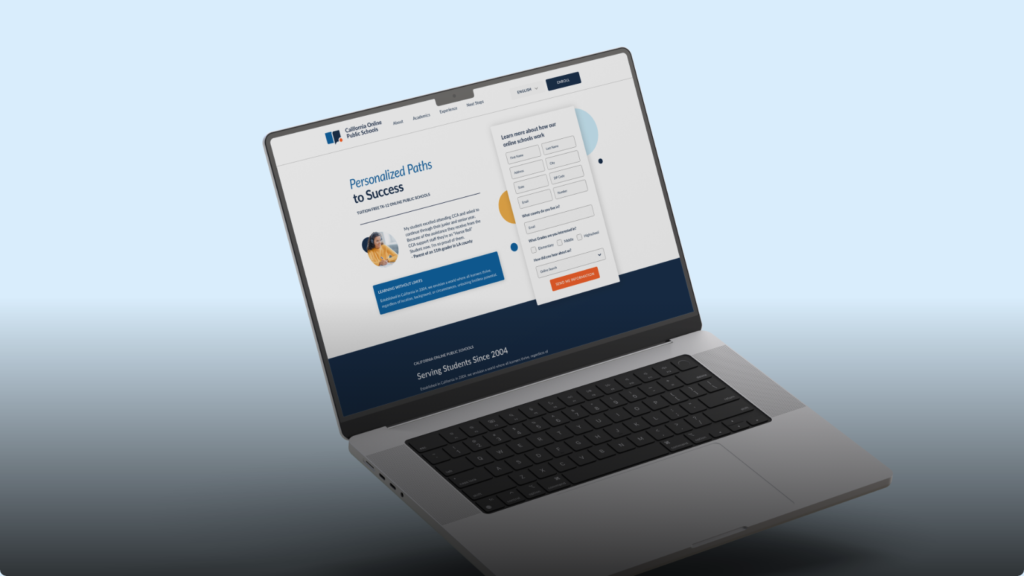
PORTFOLIO · ONLINE CHARTER SCHOOL
California Online Public Schools
1,500+ leads a month and 118x ROAS
View Project

Want a website that turns visits into applications? Book your free consultation.
Sources
- Ruffalo Noel Levitz (RNL), 2025 E-Expectations Trend Report, https://learn.ruffalonl.com/rs/395-EOG-977/images/2025_E-Expectations_Report.pdf
- UPCEA, Enrollment Process Review: Secret Shopper Analysis (December 2025), https://upcea.edu/wp-content/uploads/2025/11/Enrollment-Process-Review-Secret-Shopper-Analysis_December-2025.pdf
- Google, Web Vitals (web.dev), https://web.dev/articles/vitals
- WebAIM, The WebAIM Million, https://webaim.org/projects/million/
By Justin Nassie, President and Founder of Brandastic. Brandastic is a Costa Mesa, California digital marketing agency founded in 2010 that has worked with 450+ brands and is a Google and Microsoft Partner. Last updated December 14, 2026.


